A ranked backlog, not a mystery score
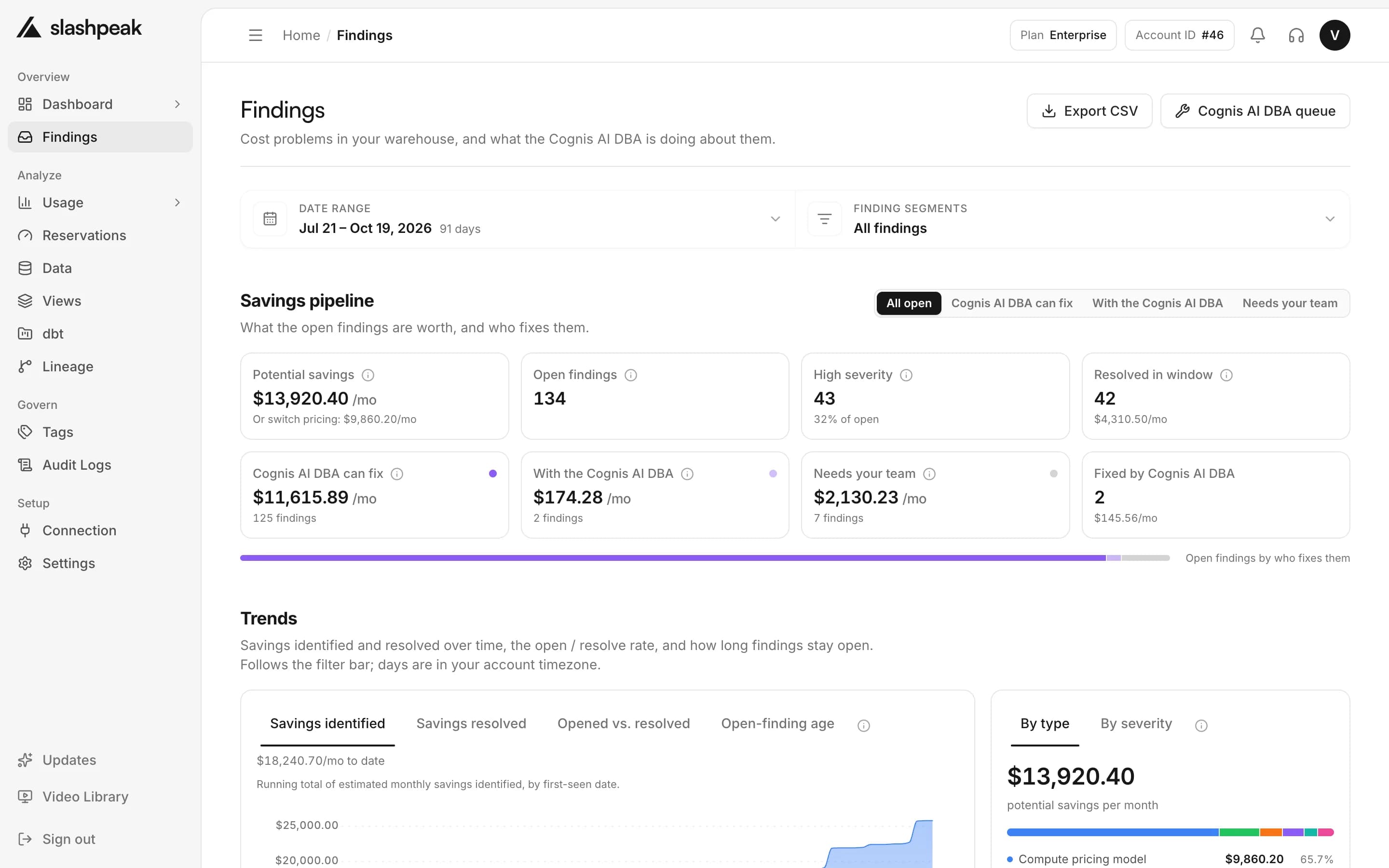
Every finding names the query or table, explains the problem in plain English, and puts a dollar figure on fixing it.
23 documented rules
Queries, storage, schema design and capacity.
A dollar on every finding
Each one carries a monthly estimate, with the math shown.
First list in under 10 minutes
Connect read-only access and the first scan ranks everything.
Ranked by impact
The top of the list is always the best use of your next hour — across every category of waste.
Findings
Est. savings $14,470/mo
- $6,420/mo
Full scans on a date-partitioned table
events.page_views
- $3,980/mo
Same heavy query re-run every 10 minutes
looker · finance_daily
- $2,310/mo
Storage billed on the costlier model
dataset raw_logs
- $1,120/mo
Large table would benefit from clustering
orders.line_items
- $640/mo
Unused table still paying for storage
tmp.backfill_2025
Every finding shows the evidence and the math behind its dollar estimate — no black-box score to argue about.
- Ranked by monthly impact
- Plain-English explanations
- Closes itself once fixed
Explainable, not a score
See the evidence, the sample query and the math behind every estimate — no opaque number to argue with.
High impact
Full scans on a date-partitioned table
23 queries read all of events.page_views when they only needed the last 7 days.
Est. savings
$6,420/mo
-- suggested change
SELECT user_id, url
FROM events.page_views
WHERE event_date >= DATE_SUB(CURRENT_DATE(), INTERVAL 7 DAY)
Proof it worked
Findings close themselves when the problem goes away, so savings are realized, not promised.
Spend analyzed
$84.2K
Waste found
$21.6K
Savings realized
$14.9K
How it works
- 1
Scan
23 rules run over your job history, tables and reservations on every scan.
- 2
Rank
Each finding gets a monthly dollar estimate, and the list puts the biggest first.
- 3
Fix and confirm
Apply the fix yourself or with the Cognis AI DBA. The finding closes once the next scan no longer sees it.
Also included
The rest of what comes with Savings Findings in SlashPeak.
Query waste
Missing partition filters, repeated heavy queries, SELECT * over-fetch.
Storage
Wrong billing model and tables nobody has queried in months.
Capacity & pricing model
On-demand vs. Editions per project, dbt model and hour of day; idle reservations, contention.
Schema design
Clustering and partitioning gaps sized by their monthly cost.
Attribution
Who ran it, which tool, and which environment — a name, not just a query id.
Export as CSV
Download the full list to share it or track it in your own tools.
Works with the rest of SlashPeak
Frequently asked questions
How is the dollar estimate calculated?
From the same metadata behind the dashboard, computed on read against your latest scan — not a separate black-box score.
What kinds of problems does it find?
Query waste, storage billing model and stale tables, capacity and pricing model, schema design, and attribution gaps.
Do findings auto-apply?
No. Every finding is a recommendation — you apply the fix yourself, or let the Cognis AI DBA apply it inside a policy you control.
How do I know a fix actually worked?
The finding closes itself once the next scan stops detecting the problem — a realized saving, not a promise.
Can I see the evidence?
Yes. Every finding names the table or query, the affected metric, and includes a sample query.
Does it work across multiple projects?
Yes — findings roll up across every connected project and region into one ranked backlog.
Take control of your warehouse bill
Understand, reduce and govern your cloud data spend with SlashPeak — starting today.
- 30-day free trial
- No credit card
- Read-only access
- Set up in minutes