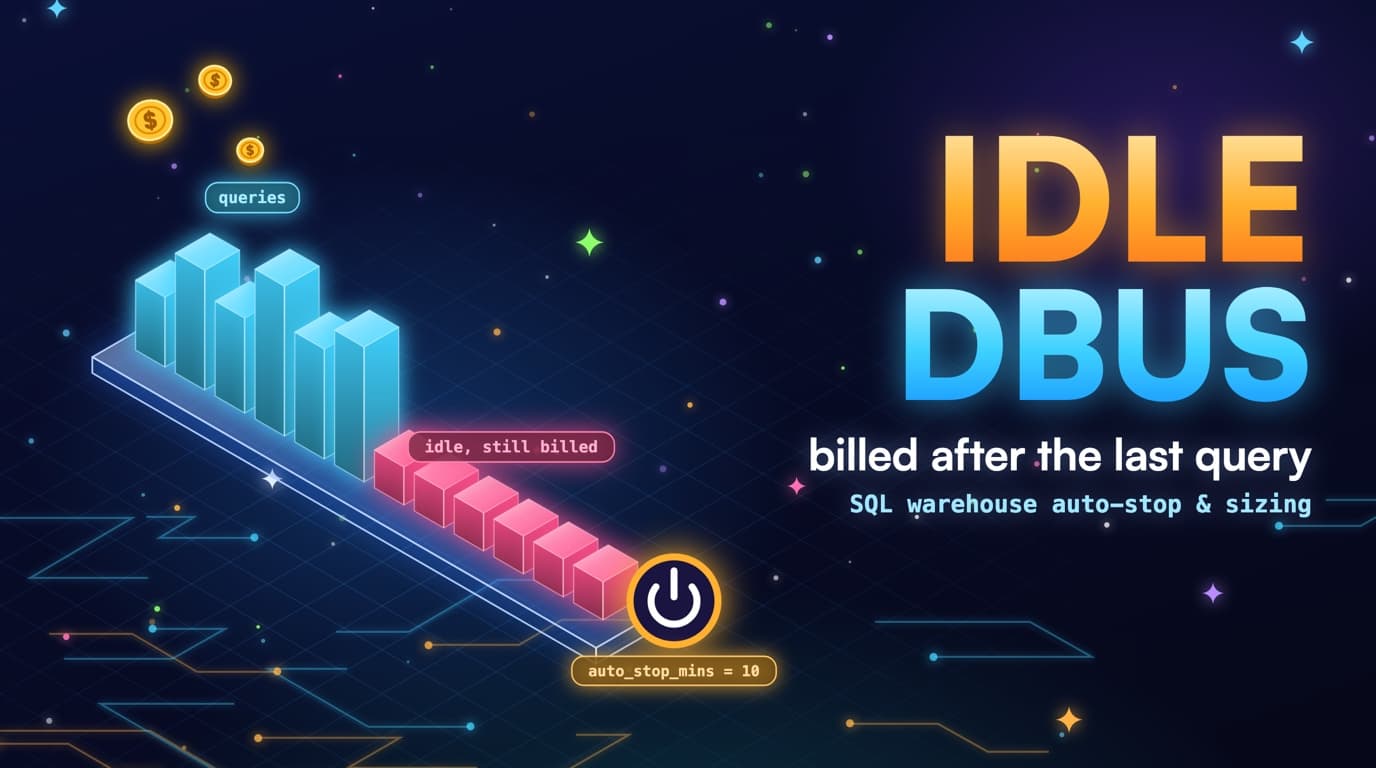
DBUs accrue while the warehouse is up
SQL warehouses bill DBU-hours, serverless or classic, while they are running. Auto-stop of 10 minutes means every Looker explore that ran for 8 seconds still bought 10 minutes of Large DBUs. Forty explores a day is forty stop-tails, not forty query runtimes.
system.compute.warehouses plus query.history with no overlapping jobs in that hour is idle. That is a different finding from a Delta full scan, and mixing the two into one Databricks-is-expensive conversation is how the wrong fix gets applied: you can rewrite DATE(event_ts) all week and still pay for a warehouse that never stops.
SELECT
  compute.warehouse_id AS warehouse_id,
  COUNT(*) AS queries,
  SUM(total_duration_ms) AS query_ms,
  SUM(read_bytes) AS bytes
FROM system.query.history
WHERE start_time >= CURRENT_DATE() - INTERVAL 30 DAYS
  AND execution_status = 'FINISHED'
GROUP BY 1;
-- Compare to warehouse running time / DBU meters.
-- Hours with warehouse up and queries = 0 are the auto-stop tail.
The mental model to borrow from Snowflake is the same: credits, or DBUs, accrue while the compute is provisioned, not while a human is looking at a result. Serverless removes a lot of cluster-ops pain, but it does not remove the tail. It just makes the tail look like a default nobody changed in the warehouse UI.
Classic warehouses left running overnight with no auto-stop are the original DBU leak. They look like the cluster used for notebooks, but they are a meter that ran from Monday's deploy until Friday's panic. Jobs compute, or serverless SQL with a short auto-stop, replaces that old habit, though jobs compute has its own DBU SKU and should be ranked separately.
Billing tables, where enabled, have the DBU meters by warehouse_id and SKU; query.history has the work, and the join between them is the diagnosis. Hours with the warehouse up and zero queries are the auto-stop tail or a forgotten classic warehouse. Hours with tiny query bytes on a Large warehouse are the size leak. Keep those as separate numbers rather than averaging them into one DBU-is-high line.
Photon, concurrency, and spot versus on-demand change the DBU rate, but they do not change the rule that a warehouse with no statements still bills. Start with uptime versus query time; rate cards come second. A cheaper SKU on a warehouse that is up 24/7 still loses to a short auto-stop on the warehouse the dashboards actually need.
A SQL warehouse's billing lifecycle
DBUs accrue from the moment the warehouse resumes until auto-stop fires, including the idle minutes after the last query finishes.
Auto-stop is a setting, not a hope
1 to 5 minutes is the usual first move for BI serverless warehouses. ETL warehouses that run 20-minute jobs can stay up longer so they do not cold-start-thrash. Classic warehouses left running overnight with no auto-stop are the original DBU leak: they look like the cluster used for notebooks.
-- SQL warehouse UI / API
-- auto_stop_mins = 5
-- cluster_size   = 'Small'  -- if query.history bytes stay small
-- spot / serverless preferred for bursty BI

-- Confirm the current setting from system tables:
SELECT warehouse_id, warehouse_name, warehouse_type,
       warehouse_size, auto_stop_minutes
FROM system.compute.warehouses;
Cold start is the objection you will hear in the first review. Serverless SQL cold start is typically seconds to low tens of seconds, not the minutes people remember from classic clusters. Measure it: if the finance dashboard's users wait four extra seconds and you drop 9 minutes of Large tail per explore, that trade wins. If a 20-minute dbt run would restart the warehouse four times an hour, it does not. Those are different warehouses.
Auto-stop of 10 minutes is a default, not a requirement. Auto-stop of 45 minutes is usually a team trying to be kind to Looker and accidentally buying a permanent Large. Put the number on a spreadsheet next to query count and p95 duration. A warehouse with a 6-second p95 and a 45-minute auto-stop is not a performance setting; it is a cost setting nobody revisited.
Minimum running time still exists as a product reality: once resumed, you pay for a floor of uptime. That is why bursty BI is so sensitive to auto-stop. Twenty isolated 8-second explores with a 10-minute tail add up to 200 minutes of Large. The same twenty explores packed into a 3-minute window by a shared extract schedule produce one tail. Scheduling is a DBU tool.
-- Operational, not SQL: schedule Looker / dashboard extracts
-- into a 10-minute window instead of 40 independent hits.
-- One resume + one auto-stop tail, not forty.
SELECT
  DATE_TRUNC('HOUR', start_time) AS hour,
  COUNT(*) AS queries,
  COUNT(DISTINCT compute.warehouse_id) AS warehouses
FROM system.query.history
WHERE client_application ILIKE '%looker%'
  AND start_time >= CURRENT_DATE() - INTERVAL 7 DAYS
GROUP BY 1
ORDER BY 1;
Avoid setting auto-stop to 1 minute on a warehouse that serves interactive SQL editor users who run a query, think, and run another: they will pay more in start storms than they save in tails. Split instead, with a short-stop warehouse for dashboards that fire and forget and a slightly longer-stop warehouse for humans. system.query.history's client_application column tells you which is which.
The 10-minute tail is a spreadsheet, not a vibe
Write the arithmetic down. Query runtime plus auto-stop minus overlap with the next query is the billed window. If explores never overlap, billed minutes equal runs times (runtime plus auto-stop). If they pile into the same resume, billed minutes collapse toward one runtime plus one tail. Overlap is the hidden efficiency of a busy morning and the hidden waste of a quiet afternoon.
A Large warehouse at a list DBU rate that is several times Small turns that arithmetic into rent. Forty isolated explores, 8 seconds each, 10-minute auto-stop, is roughly 400 minutes of Large. The same explores on Small with 5-minute auto-stop and a shared refresh window can be an order of magnitude less. You do not need a vendor calculator. You need query counts, a size, and auto_stop_minutes from system.compute.warehouses.
WITH q AS (
  SELECT
    compute.warehouse_id AS warehouse_id,
    COUNT(*) AS queries,
    SUM(total_duration_ms) / 60000.0 AS query_minutes
  FROM system.query.history
  WHERE start_time >= CURRENT_DATE() - INTERVAL 30 DAYS
    AND execution_status = 'FINISHED'
  GROUP BY 1
)
SELECT
  w.warehouse_name,
  w.warehouse_size,
  w.auto_stop_minutes,
  q.queries,
  q.query_minutes,
  q.queries * w.auto_stop_minutes AS naive_tail_minutes
FROM system.compute.warehouses w
JOIN q ON q.warehouse_id = w.warehouse_id
ORDER BY naive_tail_minutes DESC;
-- naive_tail_minutes overstates if queries overlap.
-- It is still the right scare chart for bursty BI.
Month-end close changes the overlap story. The warehouse that looks idle in week two is slammed on the last two days. Do not size for the close and then leave that size up for the other twenty-eight days. A second warehouse, or a temporarily larger warehouse you actually stop, is cheaper than a permanent Large that made March close feel safe.
Serverless scales min and max clusters. Max clusters for burst is not the same as min clusters equal to max. A min of 1 and a max of 8 handles the close. A min of 8 is a 24/7 reservation you did not mean to buy. query.history concurrency by minute tells you whether min greater than 1 ever earned its keep.
Put the tail on the same ranked list as scan waste, but do not add the dollars together as if they were one bug. A full scan on a well-stopped Small warehouse is a SQL problem. A tiny scan on a never-stopped Large is a capacity problem. SlashPeak will keep those as separate findings so the OPTIMIZE and the auto-stop change do not get mixed.
Isolated queries each buy their own tail
Forty explores spread out each add a full auto-stop tail. The same forty packed into one refresh window share a single tail.
Size is a cost model
A dashboard that read 80 MB does not get 8 times faster on Large; it gets an 8 times bigger DBU meter on the same auto-stop tail. query.history duration versus read_bytes tells you whether the warehouse is compute-bound or just oversized. Separate ETL and BI warehouses so a dbt run does not force Looker onto Large.
Scale-up helps scans and shuffles that are actually large. It does not help a point lookup, a metadata query, or a dashboard that already returns in two seconds on Small. If p95 duration is already under the SLA on Medium, Large is just a rate card. Move down a size for a week and watch p95 and error rates; if they hold, you found idle size, not idle uptime.
Photon can change the size conversation: a Photon-enabled warehouse may finish the same SQL on a smaller size, and that is a real experiment worth running. It is not a reason to leave Large in place and also enable Photon. Pick one variable, re-measure duration and DBUs, then pick the other.
Warehouse size is also a queueing story. If jobs wait on capacity, you will see waiting_at_capacity_duration_ms, or the equivalent wait columns your channel exposes, climb while execution stays reasonable. That is a max-clusters or size conversation, not an auto-stop conversation: shortening auto-stop makes waits worse if the warehouse is already too small for the morning pile-up. Read the wait columns before you shrink.
Spot and serverless discounts are real, but secondary: an oversized spot warehouse is still oversized. Apply size and auto-stop first, then take the cheaper SKU. Ranking SKU savings ahead of idle Large is how a team celebrates a 10 percent rate cut on a warehouse that should have stopped hours earlier.
Three independent checks on the same metrics
Idle, queued, and oversized come from different columns and call for different fixes. Shrinking a queued warehouse makes the queue worse; shortening auto-stop does nothing for it.
- Idle: warehouse uptime with no query.history overlap. Shorten auto-stop.
- Oversized: short jobs, small bytes, Large or bigger. Drop a size and re-measure.
- Queued: wait columns high, execution fine. Size or max clusters, not a shorter tail.
- Classic left on: notebooks that never terminate. Serverless or jobs compute instead.
Serverless, classic, and jobs compute are different meters
SQL warehouses, all-purpose clusters, and jobs compute show up as different SKUs. Collapsing them into Databricks spend hides the lever. A classic all-purpose cluster that stays up for notebooks is not fixed by SQL warehouse auto-stop. A job that already runs on jobs compute is not fixed by shrinking the BI warehouse. Split the bill before you split the tickets.
All-purpose clusters are the notebook habit. They are also the habit most likely to have autotermination set to 120 minutes, or off, because someone was attaching a library. If query.history for that compute is empty for hours while the cluster is up, that is idle. Move scheduled work to jobs compute. Keep a small interactive cluster for actual exploration, with autotermination measured in minutes, not hours.
Jobs compute starts and stops with the run, which is the right default for dbt, Lakeflow/Workflows, and DLT. The waste there is usually a too-large node type, a too-long idle inside a notebook task, or a job that full-scans Delta (covered in the Delta scan post). Applying SQL warehouse auto-stop habits to a job cluster that already dies at the end of the run does not help; that cluster was never the problem.
Serverless SQL is the BI default worth defending. You still set size, min/max clusters, and auto-stop. Serverless is not a personality. It is a SKU with knobs. Teams that migrate classic SQL to serverless and copy the 45-minute auto-stop have migrated the tail, not the waste.
system.billing.usage, where the workspace has it enabled, is how you prove the split. sku_name plus usage_metadata.warehouse_id plus usage_quantity is the meter. query.history is the work. If billing is gated, fail soft and rank from warehouse settings plus query overlap. SlashPeak will do the same: no fake DBU dollars from a missing billing table.
SELECT
  usage_metadata.warehouse_id AS warehouse_id,
  sku_name,
  SUM(usage_quantity) AS dbu
FROM system.billing.usage
WHERE usage_date >= CURRENT_DATE() - INTERVAL 30 DAYS
  AND billing_origin_product = 'SQL'
GROUP BY 1, 2
ORDER BY dbu DESC;
-- If this relation is workspace-gated, stop. Do not guess DBUs
-- from warehouse size alone. Fail soft.
Separate BI from ETL so Large is not the default
One warehouse for everything is how dbt at 2am forces Looker onto Large at 9am. The ETL job needed the size. The dashboard never did. After the job, nobody shrank the warehouse. Split: a warehouse named for BI with Small or Medium and a short auto-stop, a warehouse named for ETL with the size the job actually profiles, stopped when the job ends or auto-stopped aggressively between runs.
Routing is a connection-string problem, not a hope. Looker, Tableau, and the SQL editor each have a warehouse id. If they all point at etl_xl because that was the one that worked in 2024, you will never see the BI size experiment succeed. query.history client_application joined to warehouse_name is the audit. Misrouted BI is a finding even when auto-stop is already 5 minutes.
SELECT
  w.warehouse_name,
  h.client_application,
  h.executed_by,
  COUNT(*) AS queries,
  SUM(h.total_duration_ms) AS duration_ms,
  SUM(h.read_bytes) AS bytes
FROM system.query.history h
JOIN system.compute.warehouses w
  ON w.warehouse_id = h.compute.warehouse_id
WHERE h.start_time >= CURRENT_DATE() - INTERVAL 30 DAYS
GROUP BY 1, 2, 3
ORDER BY duration_ms DESC;
Shared warehouses also mix Photon and non-Photon, and mix humans with service principals. A human who runs an unconstrained SELECT in the SQL editor on the ETL warehouse can pin the dbt run. Chargeback wants executed_by. Isolation wants two warehouses. You probably want both. Isolation first, because it is the DBU lever; chargeback second, because it is the conversation.
Do not create twelve warehouses as a personality test. Each warehouse has a tail. Twelve Small warehouses with 10-minute auto-stop and sparse traffic can cost more than two well-used Mediums. Group by SLA and working set: interactive BI, scheduled BI extracts, ETL, ad-hoc. Four is usually enough. Twelve is usually a naming scheme.
How to join warehouses to query.history
The runbook is mechanical. List warehouses. For each, take auto_stop_minutes, warehouse_size, warehouse_type. Left join 30 days of query.history aggregated to hour. Hours with DBU-like uptime and zero queries are idle. Hours with queries whose read_bytes sit in megabytes on a Large warehouse are oversized. Hours with wait columns high are undersized or under-clustered.
WITH hours AS (
  SELECT
    compute.warehouse_id AS warehouse_id,
    DATE_TRUNC('HOUR', start_time) AS hour,
    COUNT(*) AS queries,
    SUM(total_duration_ms) AS duration_ms,
    SUM(read_bytes) AS bytes
  FROM system.query.history
  WHERE start_time >= CURRENT_DATE() - INTERVAL 30 DAYS
  GROUP BY 1, 2
)
SELECT
  w.warehouse_name,
  w.warehouse_size,
  w.auto_stop_minutes,
  h.hour,
  COALESCE(h.queries, 0) AS queries,
  COALESCE(h.bytes, 0) AS bytes
FROM system.compute.warehouses w
LEFT JOIN hours h ON h.warehouse_id = w.warehouse_id
ORDER BY w.warehouse_name, h.hour;
-- Empty query counts on a warehouse you know was running
-- are the idle tail. Confirm with billing.usage when allowed.
You will not get perfect uptime from query.history alone. A warehouse can be up with no statements in the history table if system tables lag, if the statement failed before logging, or if the work ran on a cluster that is not a SQL warehouse. That is why billing.usage is the better uptime meter when you have it, and why a scanner must fail soft when you do not.
Statement_text is not required for idle detection. Idle is the absence of statements. Keep statement_text for the oversized case, where you need to see that the work was a tiny dashboard, and for attribution. Fingerprint it PII-safe. Do not store a query that embedded a customer's email so you could prove a warehouse was Large.
Permissions will bite. system.compute.warehouses and system.query.history are the grants worth asking for. SELECT on user catalogs is not. Warehouse edit APIs that would let a tool resize for you are not. SlashPeak will recommend auto_stop_minutes = 5 and size = Small. It will not PATCH the warehouse.
The meter is often the waste, not the SQL
Fixing DATE(event_ts) still matters. It does not replace a warehouse that never stops. Treat capacity as its own ranked list. You apply the warehouse config. Nothing auto-resizes.
The political failure mode is the same as BigQuery reservations: the person who can change auto-stop is not the person who wrote the explore. Put the finding in language both can use: this warehouse billed N DBU-hours last month, query time was M, size is Large, auto-stop is 45 minutes, and the explore's p95 is 6 seconds. That paragraph creates a ticket; a one-line complaint that Databricks is expensive does not.
Re-measure after each knob. Change auto-stop, wait a week, look at query minutes versus DBU quantity. Then change size. Then split BI from ETL. If you change all three on a Friday you will not know which lever worked, and you will revert all three on Monday when one dashboard is slow.
SlashPeak will rank idle DBUs separately from scan waste so the warehouse config and the OPTIMIZE do not get mixed. The Databricks scanner is coming soon. Same 30-day window as the BigQuery scanner, recommend-only, no writes. Join the waitlist from the Databricks product page if you want that list on a workspace instead of a notebook.
Takeaways
- SQL warehouses bill while they are running. Auto-stop of 10 minutes is 10 minutes of DBUs after the last 8-second explore.
- Isolated explores do not share a tail. Packed refreshes do. Scheduling is a DBU tool.
- Large for a small scan is a different leak from a Delta prune miss. Measure both, and keep the dollars on separate tickets.
- Serverless, classic all-purpose, and jobs compute are different SKUs. Auto-stop habits from one do not transfer to the others.
- Split BI and ETL warehouses so a dbt run cannot freeze Looker on Large. A dozen small warehouses that each carry a tail can cost more than two well-used ones.
- High wait columns mean undersized. An empty query.history on a running warehouse means idle. Those are opposite knobs.
- SlashPeak will rank idle DBUs separately from scan waste so the warehouse config and the OPTIMIZE do not get mixed (coming soon, recommend-only, system tables only).